
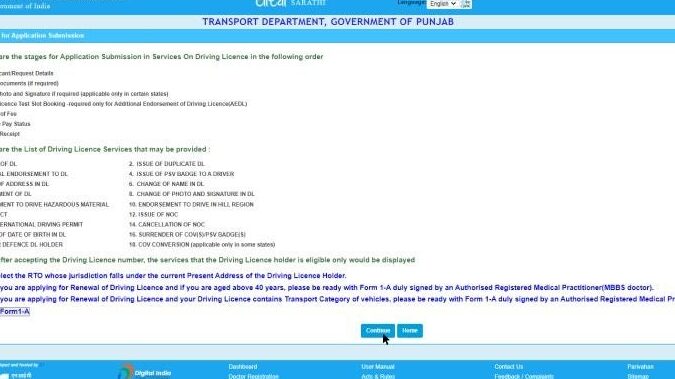
Renewing your Punjab driving license online can save you time and hassle. In this article, we will guide you through the simple steps to renew your driving license from the comfort of your own home. Say goodbye to long queues and paperwork, and say hello to a convenient and efficient renewal process. Let’s get started!
Renew Your Punjab Driving Licence Online: A Step-by-Step Guide
Renewing your Punjab driving license online can be a convenient and time-saving process. Here is a step-by-step guide to help you navigate through the Punjab driving license renewal online procedure smoothly:
Step 1: Visit the official website of the Punjab Transport Department.
Step 2: Look for the ‘Online Services’ section on the website and select ‘Driving License Renewal’ from the dropdown menu.
Step 3: Fill in your current driving license details, including license number and personal information.
Step 4: Upload any required documents, such as proof of address or identity, as per the guidelines provided.
Step 5: Proceed to the payment gateway to pay the renewal fees online.
Step 6: Once the payment is confirmed, you will receive a confirmation message along with a reference number.
Step 7: Your renewed Punjab driving license will be processed, and you will be notified about the status via email or SMS.
It is essential to ensure that all the information provided during the Punjab driving license renewal online process is accurate and up to date to avoid any delays or issues.
By following these simple steps, you can renew your Punjab driving license online efficiently and without hassle. Remember to keep a digital copy of the renewed license for your records and safekeeping.
Renewing Your Learner’s Driving Licence Online in Punjab: A Step-by-Step Guide
Renewing your Punjab driving license online can be a convenient and time-saving process. Below is a step-by-step guide to assist you in successfully renewing your learner’s driving license online in Punjab.
Step 1: Visit the Official Website
Go to the official website of the Punjab Transport Department where online license-related services are provided.
Step 2: Create an Account
Create an account on the website by providing the required information such as your name, contact details, and email address.
Step 3: Login to Your Account
Once your account is created, log in using your credentials to access the online services.
Step 4: Select License Renewal
Find the option for Punjab driving license renewal and select the type of license you want to renew (in this case, a learner’s license).
Step 5: Upload Documents
Upload the necessary documents such as your existing license, proof of address, and proof of identity as per the requirements.
Step 6: Pay the Renewal Fee
Proceed to pay the renewal fee online using the available payment options on the portal.
Step 7: Book a Slot for Biometric Verification
Schedule a convenient date and time to visit the nearest licensing authority for biometric verification.
Step 8: Receive Confirmation
Upon successful verification, you will receive a confirmation message or email regarding the renewal of your learner’s driving license in Punjab.
Following these steps will ensure a smooth and hassle-free experience when renewing your Punjab driving license online. Remember to double-check all information provided and adhere to the guidelines to avoid any delays in the renewal process.
Online Guide: Check Your Punjab License in a Few Simple Steps
If you are looking to renew your Punjab driving license online, you can easily do so by following a few simple steps. The process is straightforward and can save you time and hassle. Here is a guide to help you navigate through the Punjab driving license renewal online process efficiently.
Step 1: Visit the Official Website
Start by visiting the official website of the Punjab Transport Department. Look for the section related to driving licenses or renewals. This is where you will find the necessary information and forms to initiate the renewal process.
Step 2: Fill in the Required Details
Once you have located the renewal section, fill in the required details accurately. This may include your current license number, personal information, and any other details requested by the online form.
Step 3: Upload Documents
Scan and upload any necessary documents such as proof of address, identity, and existing license. Make sure to follow the guidelines provided for document formatting and size to avoid any upload errors.
Step 4: Pay the Renewal Fee
Proceed to the payment section and pay the renewal fee online. Ensure that you are using a secure payment gateway to protect your financial information. Once the payment is processed successfully, you will receive a confirmation of payment.
Step 5: Await Verification
After submitting your application and payment, wait for the transport department to verify your details and documents. This process may take a few days, so be patient and check your email regularly for any updates.
Step 6: Download the Renewed License
Once your renewal application is approved, you will receive a notification to download your renewed Punjab driving license. Follow the instructions provided to access and download your updated license.
By following these steps, you can easily renew your Punjab driving license online without any hassle. Remember to keep a digital and physical copy of your renewed license for future reference. If you encounter any issues during the renewal process, don’t hesitate to contact the Punjab Transport Department for assistance.
Punjab 2024 Driving License Fee: How Much to Budget?
If you are considering renewing your Punjab driving license online in 2024, it’s important to budget accordingly, taking into account the applicable fees. Understanding the costs involved can help you plan and avoid any surprises during the renewal process.
When renewing your driving license online in Punjab, you can expect to pay the following fees:
| Fee Description | Amount |
|---|---|
| Renewal Fee | Rs. XXX |
| Smart Card Fee | Rs. XXX |
| Service Fee | Rs. XXX |
| Total | Rs. XXX |
It’s important to note that these fees are subject to change, so it’s recommended to check the official Punjab transport department website for the most up-to-date information before initiating the online renewal process.
By budgeting for the Punjab driving license renewal fees in advance, you can ensure a smooth and hassle-free online renewal process. Remember to have all the necessary documents and information ready to expedite the process and avoid any delays.
Before we part ways, here’s a final tip for Punjab driving license renewal online: ensure you have all the necessary documents and information ready before starting the renewal process to make it smoother and quicker.
Thank you for reading our blog on legal, regulatory, and practical aspects related to certificates, contracts, declarations, licenses, renewals, and tax issues. We hope you found the information helpful and informative.
Remember, this blog is for informational purposes only. For specific guidance on your Punjab driving license renewal or any other legal matters, always consult with a professional in the field.
We love hearing from our readers! Feel free to leave a comment sharing your thoughts, share this article on social media to help others, or explore our other related articles for more valuable insights. Your participation makes this community thrive!
Safe driving and best wishes for your license renewal process!
If you found this article informative and engaging, be sure to visit our Drivers Licenses section for more insightful articles like this one. Whether you’re a seasoned enthusiast or just beginning to delve into the topic, there’s always something new to discover in auslegalhub.com. See you there!

