
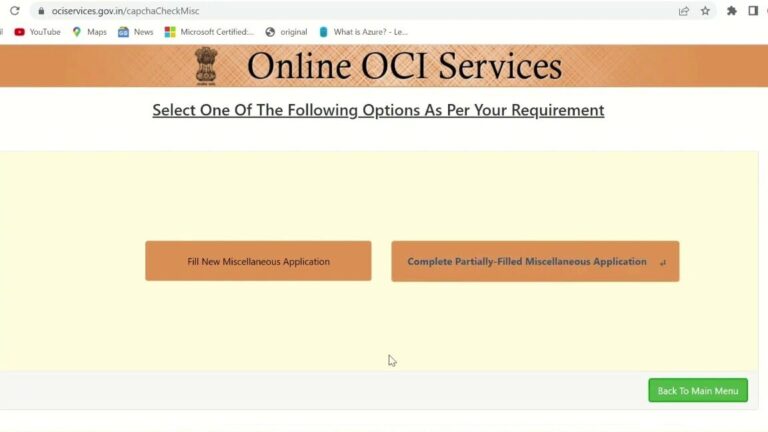
Renewing your Overseas Citizen of India (OCI) card online can be a straightforward process if you know the steps to follow and the requirements to meet. In this article, we will guide you through the necessary procedures and provide you with practical tips to successfully renew your OCI card without any hassle.
Easy Steps to Update Your OCI Online: A Complete Guide
When it comes to renewing your OCI (Overseas Citizen of India) online, following a few simple steps can make the process smooth and hassle-free. Here’s a complete guide on how to update your OCI online efficiently:
Step 1: Access the OCI Portal
Start by visiting the official OCI portal on the government website. Create an account or log in if you already have one.
Step 2: Fill in the Renewal Form
Once logged in, locate the renewal form and fill in all the required details accurately. Make sure to double-check the information provided to avoid any errors.
Step 3: Upload Documents
Prepare the necessary documents such as proof of address, passport copy, and existing OCI card. Scan these documents and upload them to the portal as per the specifications mentioned.
Step 4: Pay Renewal Fees
Proceed to the payment section and pay the renewal fees using the available online payment options. Keep a copy of the payment receipt for future reference.
Step 5: Submit Application
After completing the form, document upload, and payment, submit your renewal application. You will receive a confirmation message once the application is successfully submitted.
By following these easy steps to update your OCI online, you can ensure a hassle-free renewal process. Remember to keep all your documents handy and provide accurate information to avoid any delays in processing your application.
Renewing Your OCI Card: The Ultimate Guide for a Smooth Process
Renewing your OCI (Overseas Citizen of India) card online can be a straightforward process if you follow the necessary steps diligently. Here is a comprehensive guide to help you navigate through the renewal process smoothly:
Step 1: Check Eligibility
Before starting the renewal process, ensure that you are eligible to renew your OCI card online. Check the expiration date on your current OCI card to see if it is time for renewal.
Step 2: Prepare Required Documents
Gather all the necessary documents for the renewal process, including your current OCI card, passport, and any other supporting documents that may be required.
Step 3: Access the Online Portal
Visit the official website for OCI services and create an account if you don’t have one already. Log in to the portal using your credentials to initiate the renewal process.
Step 4: Fill Out the Renewal Form
Complete the renewal application form with accurate information. Double-check all details before submitting the form to avoid any errors that could delay the process.
Step 5: Upload Documents
Scan and upload all the required documents in the specified format. Make sure the documents are clear and legible to facilitate the verification process.
Step 6: Pay the Renewal Fee
Proceed to pay the renewal fee online using the available payment methods. Keep a copy of the payment receipt for your records.
Step 7: Track Application Status
After submitting the renewal application, track the status of your application online regularly. This will keep you informed about any updates or additional requirements.
By following these steps diligently and ensuring all required documents are in order, you can renew your OCI card online efficiently. Remember to renew OCI online ahead of time to avoid any last-minute hassles and ensure a smooth renewal process.
Traveling to India with an Old OCI Card and a New Passport: What You Need to Know
Traveling to India with an Old OCI Card and a New Passport can be a smooth process if you follow the necessary steps to ensure a hassle-free experience. If you have recently renewed your passport and still possess an old OCI (Overseas Citizen of India) Card, here’s what you need to know to navigate this situation effectively.
Renewing your OCI card online is a convenient option for individuals looking to update their information without visiting a physical office. However, when it comes to traveling with an old OCI Card and a new passport, there are specific guidelines to keep in mind:
- Carry both your old OCI Card and new passport: Make sure to carry both your old OCI Card and new passport when traveling to India. This is essential to establish your identity and OCI status.
- Check OCI Card validity: Verify the validity of your OCI Card before traveling. If your OCI Card has expired or is close to expiration, consider renewing it online to avoid any issues during your trip.
- Update OCI Card with new passport details: If you have obtained a new passport, ensure that your OCI Card is linked to the correct passport number. You can update this information online through the official OCI portal.
- Carry supporting documents: It is advisable to carry supporting documents such as proof of OCI Card application or renewal, along with your old and new passport copies, to provide additional evidence if required.
By following these steps and ensuring that your OCI card renewal online is up to date, you can travel to India with confidence and without any significant hurdles. Remember to plan ahead, check all documentation requirements, and stay informed about any recent updates or changes in OCI regulations to make your journey seamless.
Stay Compliant: Updating Your OCI with a New Australian Passport
If you have recently obtained a new Australian passport and hold an Overseas Citizen of India (OCI) card, it is essential to update your OCI with the new passport information to stay compliant. Updating your OCI card with a new passport can be done online, making the process convenient and efficient. Here’s a step-by-step guide on how to renew OCI online with your new Australian passport:
Step 1: Prepare Required Documents
Before starting the online renewal process, make sure you have the following documents ready:
- Old and new Australian passports
- OCI card details
- Current address proof
- Recent passport-size photograph
Step 2: Access the Online OCI Portal
Visit the official OCI website and create an account if you don’t already have one. Log in to your account to begin the renewal process.
Step 3: Fill Out the Renewal Form
Complete the online renewal form with accurate information, including your old and new passport details. Upload the required documents as mentioned in Step 1.
Step 4: Pay the Renewal Fee
Proceed to pay the renewal fee online using the secure payment gateway on the portal. Keep a copy of the payment receipt for future reference.
Step 5: Submit the Application
Review all the information provided in the renewal form and the uploaded documents. Submit the application online. You will receive a confirmation email once the application is successfully submitted.
By following these steps, you can easily update your OCI with a new Australian passport online. Remember to keep track of your application status on the portal to ensure a smooth renewal process.
As a final tip on how to renew your OCI online, remember to double-check all the information you provide before submitting your application. Any errors or discrepancies could delay the process. Once you have successfully submitted your renewal application, keep track of its status by regularly checking the official website or contacting the relevant authorities if needed.
Thank you for reading our blog and staying informed about legal and regulatory matters. Your participation is valuable to us! Feel free to share your experiences or questions in the comments section below, or share this article on social media to help others facing similar challenges. Don’t forget, for specific guidance related to your situation, consult with a professional in the field.
If you found this article informative and engaging, be sure to visit our IT Certifications section for more insightful articles like this one. Whether you’re a seasoned enthusiast or just beginning to delve into the topic, there’s always something new to discover in auslegalhub.com. See you there!

