
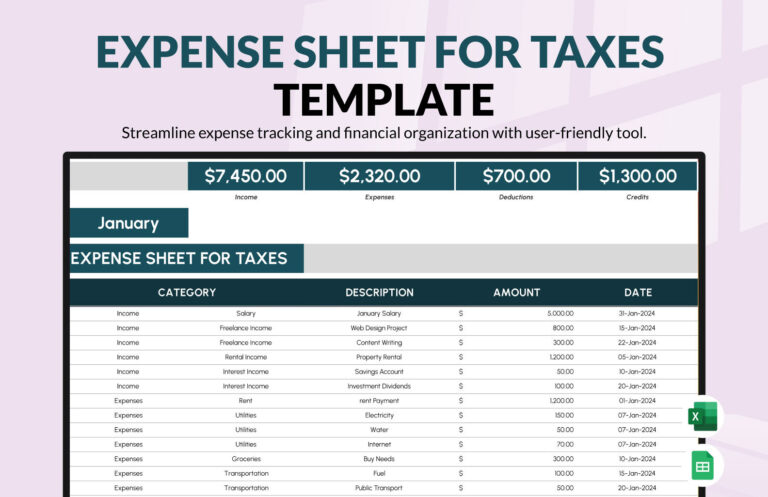
Managing your tax return can be a daunting task, but with the right tools and organization, it can be simplified and less stressful. One effective way to stay on top of your tax obligations is by using a tax return Excel template. This tool can help you track income, expenses, deductions, and more, ensuring that you have all the necessary information ready when it’s time to file your taxes. In this article, we will explore the benefits of using a tax return Excel template and provide tips on how to make the most of this valuable resource.
Master Your Taxes: Unveiling Excel’s Tax Template Options
When it comes to managing your taxes efficiently, leveraging Excel’s tax template options can be a game-changer. Excel provides a versatile platform that allows you to organize, calculate, and analyze your tax-related data effectively. Let’s delve into how you can master your taxes using Excel’s tax templates.
Benefits of Using Excel for Tax Returns:
Excel offers several advantages when it comes to handling tax-related tasks:
- Customization: Tailor your tax templates to suit your specific needs.
- Automation: Streamline calculations and minimize errors with built-in functions.
- Organization: Keep all your tax data in one place for easy reference.
Steps to Utilize Excel’s Tax Templates:
Follow these steps to make the most of Excel’s tax template options:
- Select the Right Template: Choose a tax template that aligns with the type of tax return you need to file.
- Input Your Data: Enter your financial information accurately into the designated cells.
- Utilize Formulas: Leverage Excel’s formulas to automate calculations such as tax owed or tax refund.
- Review and Validate: Double-check your entries and formulas to ensure accuracy.
- Save and Backup: Save your Excel file securely and create backups to prevent data loss.
Tips for Enhancing Your Tax Templates:
Consider the following tips to optimize your tax templates further:
- Use Formatting: Apply formatting features to enhance the visual appeal and readability of your tax template.
- Include Notes: Add comments or notes to explain specific entries or calculations for future reference.
- Track Changes: Use Excel’s tracking features to monitor any modifications made to your tax template.
By mastering Excel’s tax template options, you can streamline your tax return process and gain better control over your financial obligations. Start organizing your tax data effectively today with Excel’s versatile templates!
Mastering Excel: Your Step-by-Step Guide to Preparing Income Tax Returns
When it comes to preparing income tax returns efficiently, using an Excel template can be a game-changer. By mastering Excel and leveraging it for tax purposes, you can streamline the process and ensure accuracy in your financial documentation. Below are some key steps to help you make the most of a tax return Excel template:
Step 1: Organize Your Data
Before diving into the Excel template, gather all necessary documents such as income statements, expense receipts, and investment records. Having your data organized will make it easier to input information into the template accurately.
Step 2: Input Data Into the Template
Open the tax return Excel template and start inputting your financial data into the designated cells. Be sure to fill in all the relevant sections, including income sources, deductions, and credits. Double-check your entries to avoid errors.
Step 3: Utilize Formulas and Functions
Excel offers a wide range of formulas and functions that can help automate calculations in your tax return. Use functions like SUM, AVERAGE, and IF to simplify complex calculations and ensure accuracy in your final tax figures.
Step 4: Review and Validate
Once you have completed filling out the template and applied necessary formulas, take the time to review all the information. Validate the numbers against your original documents to catch any discrepancies or oversights.
Step 5: Save and Backup Your File
After finalizing your tax return in Excel, save the file in a secure location and create backups to avoid any data loss. Consider using cloud storage or external drives to store your financial information safely.
By following these steps and mastering Excel for tax return purposes, you can streamline the process and ensure accurate documentation of your income and expenses. Take advantage of Excel’s features to simplify calculations and stay organized throughout the tax preparation process.
Mastering Tax Formulas in Excel: Your Ultimate Guide
When it comes to handling your taxes efficiently, leveraging Excel can be a game-changer. Mastering tax formulas in Excel can streamline the process and make managing your tax return a breeze. To excel in this task, utilizing a tax return Excel template can provide the structure and organization needed to stay on top of your finances.
Using a tax return Excel template can help you input your financial data systematically, calculate taxes accurately, and visualize your financial situation clearly. To make the most out of this tool, familiarize yourself with some essential tax formulas in Excel:
| Formula | Description |
|---|---|
| =SUM() | Calculates the sum of a range of cells. |
| =IF() | Evaluates a condition and returns one value if the condition is true and another value if the condition is false. |
| =VLOOKUP() | Searches for a value in the first column of a table and returns a value in the same row from another column. |
By mastering these tax formulas in Excel, you can automate calculations, cross-reference data, and ensure accuracy in your tax return. Additionally, using functions like conditional formatting and data validation can enhance the usability and visual appeal of your tax return Excel template.
Remember to customize your tax return Excel template to suit your specific financial situation. Input your income, expenses, deductions, and credits accurately to generate precise tax calculations. Regularly update your template with the latest financial information to maintain its relevance.
Overall, mastering tax formulas in Excel and utilizing a well-designed tax return Excel template can simplify the tax filing process and empower you to take control of your finances effectively. Stay organized, stay informed, and leverage the power of Excel to optimize your tax management strategy.
Demystifying Australian Taxes: A Guide to Tax Rates and Obligations
When it comes to navigating tax return excel templates in Australia, understanding tax rates and obligations is key to ensuring compliance and maximizing returns. Using an Excel template can streamline the process, but knowing how to input the right information is crucial. Here are some tips to demystify Australian taxes and make the most of your tax return using an Excel template:
Understanding Tax Rates:
Before diving into your tax return excel template, familiarize yourself with the different tax rates in Australia. The tax rates vary based on income levels, so it’s essential to know which bracket you fall into to calculate your taxes accurately. Here is a simplified table outlining the current tax rates for the financial year:
| Income Range | Tax Rate |
|---|---|
| $0 – $18,200 | 0% |
| $18,201 – $45,000 | 19% |
| $45,001 – $120,000 | 32.5% |
| $120,001 – $180,000 | 37% |
| Above $180,000 | 45% |
Entering Data into the Excel Template:
When using a tax return excel template, ensure you input all relevant information accurately. Include details such as income sources, deductions, and any offsets you may be eligible for. Double-check your entries to avoid errors that could result in penalties or delays in your tax assessment.
Seek Professional Advice:
If you find tax return excel templates overwhelming or have complex tax situations, seeking advice from a tax professional can help ensure your returns are filed correctly. They can provide tailored guidance based on your individual circumstances and help you maximize your deductions.
By understanding tax rates and obligations in Australia and utilizing tax return excel templates effectively, you can navigate the tax-filing process with confidence and ease.
As a final tip, when using a tax return Excel template, always remember to double-check your entries for accuracy and completeness before submitting your tax return. This simple step can help you avoid potential errors and ensure a smooth filing process.
Thank you for reading our blog and learning more about tax-related topics. If you found this article helpful, feel free to leave a comment below, share it on social media, or explore other related articles on our website.
Remember, while our blog provides valuable information, it’s essential to consult with a professional for personalized advice tailored to your specific situation. Stay informed, stay proactive, and make the most of your financial decisions!
If you found this article informative and engaging, be sure to visit our Income Tax section for more insightful articles like this one. Whether you’re a seasoned enthusiast or just beginning to delve into the topic, there’s always something new to discover in auslegalhub.com. See you there!

